

Key takeaways
- Three 17.3-inch mobile workstations with professional ISV-grade GPUs, compared on display, memory and expansion for CAD, simulation and 3D work.
Buying a 17-inch mobile workstation is really a decision about certified graphics. The large panel matters, but the reason these machines exist is that their professional NVIDIA RTX and Quadro GPUs ship with drivers validated by independent software vendors, so a CAD assembly, a simulation viewport or a point-cloud view behaves the way the application maker intended. The complication is supply: workstation makers have largely moved to 16-inch chassis, so the genuine 17.3-inch pool on Amazon US is now very small.
This shortlist is for CAD engineers, simulation analysts and 3D artists who want desktop-style screen space in a machine they can still carry between sites. Every pick below is a 17.3-inch mobile workstation whose Amazon US listing names a professional workstation GPU rather than a gaming card, and the specifications quoted here come from those listing titles and product details, not from manufacturer configurators or review units.
Quick Picks
As an Amazon Associate we earn from qualifying purchases.
| Product | Best for | Key spec from title |
|---|---|---|
| Dell Precision 7780 | Heaviest CAD and simulation loads | NVIDIA RTX 4000 Ada, 12 GB GDDR6 |
| Dell Precision 7770 | Buyers who need a 4K panel | 17.3-inch UHD 3840 x 2160 display |
| Lenovo ThinkPad P17 Gen 2 | An entry into the 17-inch class | NVIDIA Quadro T1200, 4 GB GDDR6 |
How to Choose
Confirm the GPU Is a Professional Card
The single feature that separates a mobile workstation from a large gaming laptop is the graphics card and its driver branch. Professional NVIDIA RTX A-series, RTX Ada-generation workstation and Quadro cards are the ones application vendors test and certify, and they receive driver releases tuned for stability in CAD and simulation tools rather than frame rates. When you read a listing, look for those GPU names in the title. A GeForce card with similar raw numbers is not a substitute if your software support contract assumes certified hardware.
Match the Display to the Work You Review
At 17.3 inches the panel choice changes how the machine feels day to day. A Full HD screen at 500 nits suits CAD modelling, code and document work, and it places less load on the GPU when you drive external monitors as well. A UHD 4K panel earns its keep when you review fine geometry, dense drawings or colour-critical renders, and higher refresh versions reduce blur when orbiting large models. Check the resolution, brightness and refresh figures printed in the listing rather than assuming the model line always ships one panel.
Buy Memory and Storage Headroom
Workstation projects grow into whatever memory you install. Large assemblies, finite-element models and virtual machines can push past 32 GB quickly, so a 64 GB listing removes an early upgrade and keeps every memory channel populated. Storage deserves the same thinking: a 1 TB NVMe drive fills fast once several project libraries live on it. Because many Amazon configurations are built by resellers from a base chassis, confirm the exact RAM and drive figures in the listing you buy, since the same model name covers several different builds.
Check Certification Against Your Application Version
ISV certification is granted per application and usually per release, not as a blanket badge for the laptop. Before ordering, find your exact software version on the workstation vendor’s certified hardware list and confirm the listed GPU and driver combination appears there. This matters most in regulated or client-audited work, where being able to show a certified configuration can decide whether a support ticket gets answered. It also protects you at renewal time, when an uncertified setup can complicate a maintenance agreement you rely on.
The 3 Best Options
Dell Precision 7780 Mobile Workstation

The Precision 7780 is the current-generation answer for engineers whose models have outgrown a midrange workstation. This listing pairs a 24-core Intel Core i9-13950HX with the NVIDIA RTX 4000 Ada Generation card and 12 GB of GDDR6 memory, a combination aimed at large assemblies, GPU-accelerated simulation and multi-application days where the viewport never gets a rest. The 500-nit Full HD panel keeps text and geometry crisp in bright site offices, and the listing includes a three-year onsite warranty, which suits buyers who cannot afford to ship a machine away mid-project.
Specs
- Display: 17.3 inches, 1920 x 1080, 500 nits
- Processor: Intel Core i9-13950HX, 24-core, 13th generation
- Graphics: NVIDIA RTX 4000 Ada Generation, 12 GB GDDR6
- Memory: 64 GB RAM
- Storage: 1 TB SSD
- Operating system: Windows 11 Pro
- Warranty: 3 years onsite, per listing
Best for: Engineers running heavy CAD assemblies or GPU simulation who want the strongest certified graphics in a 17.3-inch chassis.
Watch out for: Amazon hosts several Precision 7780 configurations with weaker GPUs, so verify the RTX 4000 Ada name appears in the exact listing before ordering.
Dell Precision 7770 Mobile Workstation

Choose the Precision 7770 when the panel is the priority. Its listing specifies a 17.3-inch UHD screen at 3840 x 2160 with a 120 Hz refresh rate and 500 nits of brightness, which makes it the natural pick for design review, dense drawing sets and anyone who reads fine detail all day. Underneath sits an Intel Core i7-12850HX with the NVIDIA RTX A3000 workstation GPU and 12 GB of GDDR6 memory, backed by 64 GB of DDR5 CAMM memory and a 1 TB PCIe NVMe Gen 4 drive. A fingerprint reader, smart card reader and NFC round out a security set aimed at managed fleets.
Specs
- Display: 17.3 inches, 3840 x 2160 UHD, 120 Hz, 500 nits
- Processor: Intel Core i7-12850HX, 16-core, 12th generation
- Graphics: NVIDIA RTX A3000, 12 GB GDDR6
- Memory: 64 GB DDR5 CAMM module
- Storage: 1 TB PCIe M.2 NVMe Gen 4 SSD
- Operating system: Windows 11 Pro
- Security: fingerprint reader, smart card reader, NFC
Best for: Design reviewers and CAD leads who need a 4K 17.3-inch panel and certified RTX A-series graphics in one machine.
Watch out for: Stock of this configuration is thin and listings can be single-seller, so check the seller and the stated warranty terms carefully at checkout.
Lenovo ThinkPad P17 Gen 2 Mobile Workstation
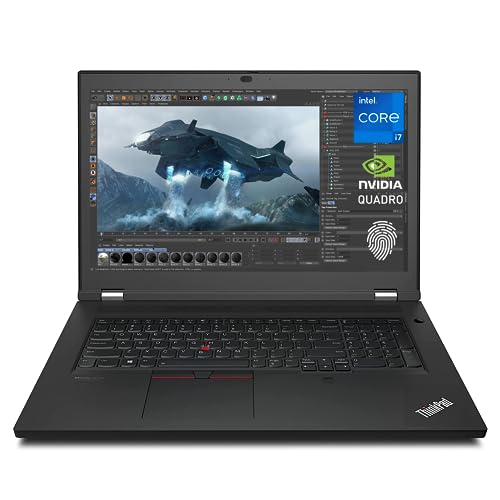
The ThinkPad P17 Gen 2 is the pragmatic route into a certified 17.3-inch workstation when the workload is mainstream CAD rather than maximum GPU throughput. This listing combines an Intel Core i7-11850H with the NVIDIA Quadro T1200 and 4 GB of GDDR6 memory, then pairs it with a generous 64 GB of RAM and a 1 TB SSD, so everyday modelling, 2D drafting and office work never feel constrained. ThinkPad buyers also get the familiar keyboard with a numeric keypad, two Thunderbolt 4 ports, wired Ethernet and a fingerprint reader, all running Windows 11 Pro under a three-year warranty per the listing description.
Specs
- Display: 17.3 inches, 1920 x 1080 Full HD
- Processor: Intel Core i7-11850H, 8 cores, up to 4.80 GHz
- Graphics: NVIDIA Quadro T1200, 4 GB GDDR6
- Memory: 64 GB DDR4 RAM
- Storage: 1 TB PCIe NVMe M.2 SSD
- Ports: 2 x Thunderbolt 4, HDMI, RJ-45 Ethernet
- Operating system: Windows 11 Pro
Best for: CAD drafters and engineers with mainstream assemblies who want ThinkPad build and serviceability in a 17.3-inch certified machine.
Watch out for: The Quadro T1200 is an entry-level workstation GPU, so very large assemblies or heavy GPU rendering will feel its limits sooner than the Dell picks.
Which One Fits Your Situation
You Carry One Machine Between Office and Site
Portability is relative at this size, but if the laptop genuinely travels, the ThinkPad P17 Gen 2 makes the fewest demands: its Full HD panel and Quadro T1200 sip less power than the flagship configurations, and the chassis is a known quantity for IT departments that already stock Lenovo docks and chargers. You give up GPU headroom, yet for drafting, markups and review work on the road, the trade is usually worth it.
Your Days Are Spent in Large Assemblies and Simulation
Pick the Dell Precision 7780. The RTX 4000 Ada card carries the most graphics memory here alongside a 24-core HX processor, and that pairing is what keeps big SolidWorks or Inventor assemblies rotating smoothly while a solver runs behind them. The three-year onsite warranty in the listing also matters at this level, because a week of downtime costs more than the difference between configurations.
You Review Detailed Designs and Colour Work
The Precision 7770 is the one built around its screen. A 3840 x 2160 panel at 17.3 inches shows fine geometry and small drawing text without constant zooming, and the 120 Hz refresh keeps orbiting models fluid during reviews. Its RTX A3000 still belongs to the certified workstation family, so application support stays intact while the display does the heavy lifting for presentation and checking work.
Your Software Contract Demands Certified Hardware
Start from your application vendor’s certified list, then work backwards. All three machines here use professional GPUs from certified workstation lines, but the exact listing configuration is what you will actually run, so match its GPU name against the list for your software release. If your version names the RTX A-series or Ada-generation cards, the Dell models fit; long-standing Quadro support makes the ThinkPad a safe answer for older certified stacks.
Common Mistakes
- Buying a 17-inch gaming laptop with a GeForce card and assuming it counts as a workstation; certification follows the professional GPU and driver branch, not screen size.
- Ordering the first configuration you see under a model name, when Amazon listings for the same workstation vary widely in GPU, memory and storage.
- Checking that a model line is ISV certified without confirming your exact application version and GPU appear on the vendor’s list.
- Ignoring the warranty terms in reseller-built listings, which can differ from the manufacturer’s standard workstation cover.
- Paying for a 4K panel and then running it scaled so aggressively that the extra resolution never helps your actual work.
Frequently Asked Questions
What does ISV certification actually guarantee?
It means the software vendor has tested that workstation configuration, including its professional GPU and driver, with a specific application release and will support it. Certification does not promise the fastest performance; it promises a validated, supportable combination. That is why the check has to be done per application and per version, using the workstation maker’s certified hardware list rather than marketing badges on a retail page.
Can a gaming laptop with a similar GPU do the same job?
It can open the same files, and for informal work it may feel fast. The difference appears when something breaks: professional cards use drivers tuned and tested for CAD applications, and vendors certify those combinations. If your livelihood or a client contract depends on support, the certified workstation is the defensible purchase. For hobby use, the gaming machine’s compromise is easier to accept.
Why are there so few 17-inch workstations left to buy?
Workstation brands have consolidated their ranges around 16-inch 16:10 chassis, which offer nearly the same working area in a smaller body. The 17.3-inch class survives mainly in flagship lines like Dell’s Precision 7000 series and in remaining stock of models such as the ThinkPad P17. That is why this roundup lists three machines instead of five: only three listings combine the size, the professional GPU and verifiable Amazon US availability.
Does certification depend on the driver I install later?
Yes, it can. Vendors certify specific driver branches alongside the hardware, and moving to a much newer gaming-oriented driver can take a setup outside the tested combination. Workstation owners usually install the driver version their application vendor lists, then update deliberately. Before changing drivers on a production machine, check the certified list again so a routine update does not quietly break your support position.
More from Amazon
Programs that pair well with the guide above. Offers and eligibility are set by Amazon and may change.
Free shipping on eligible items, Prime Video and more. Eligible new members can start with a free trial.
Start a Prime free trialA Prime membership for ages 18-24 with a trial period. Eligibility is set by Amazon.
See Prime for Young AdultsAudiobooks and podcasts to listen to on the go. Eligible new members can start with a free trial.
Try Audible freeAd-free music streaming. Eligible new subscribers can start with a free trial.
Try Music Unlimited freeAs an Amazon Associate we earn from qualifying purchases.








Write Your Review
No reviews yet. Be the first to share your experience!