

Key takeaways
- Find the best 17-inch mobile workstations for virtual machines with strong CPUs, ample RAM, workstation graphics, and large displays for smooth virtual labs.
As an Amazon Associate I earn from qualifying purchases.
The Short Answer
The best 17-inch mobile workstation for virtual machines is the Dell Precision 7780 Mobile Workstation with the Intel Core i7-13850HX processor, 32GB of DDR5 RAM, a 1TB SSD, and NVIDIA RTX 3500 Ada graphics. It gives you a modern 20-core processor, enough memory to run several virtual machines at once, and a sharp 17.3-inch UHD display that keeps host and guest windows readable side by side.
If you want more memory and stronger graphics for heavier virtual machines, step up to the Dell Precision 7770 Mobile Workstation with 64GB of RAM and NVIDIA RTX A4500 graphics. If you want the most powerful processor in this guide, look at the Dell Precision 7780 with the Intel Core i9-13950HX processor, 64GB of RAM, and NVIDIA RTX 4000 Ada graphics. If you want a more modest workstation for lighter virtual machines, the Lenovo ThinkPad P17 G2 with 32GB of RAM and NVIDIA RTX A3000 graphics is the sensible entry point here.
A virtual machine is only as smooth as the hardware underneath it. Each guest needs its own share of processor cores, memory, and disk space, and the host still needs room to breathe. A 17-inch mobile workstation usually has a larger chassis, better cooling, more memory capacity, and a workstation graphics card than a thin ultraportable laptop.
This guide focuses only on 17-inch mobile workstations. Every pick below is a laptop with a 17.3-inch screen marketed as a mobile workstation, with a workstation-class processor and professional graphics. Before you buy, confirm the exact configuration on the listing, because workstation models are sold in many configurations with the same model name.
Our Top Picks
- Best overall: Dell Precision 7780 Mobile Workstation, Intel Core i7-13850HX, 32GB DDR5 RAM, 1TB SSD, NVIDIA RTX 3500 Ada — a balanced modern workstation for most virtual machine workloads.
- Best for heavy virtual machines: Dell Precision 7770 Mobile Workstation, Intel Core i7-12850HX, 64GB RAM, 512GB SSD, NVIDIA RTX A4500 — more memory and more graphics memory for demanding guests.
- Best for maximum processor power: Dell Precision 7780 Mobile Workstation, Intel Core i9-13950HX, 64GB RAM, 1TB SSD, NVIDIA RTX 4000 Ada — the strongest processor in this guide for many simultaneous guests.
- Best for lighter lab work: Lenovo ThinkPad P17 G2, Intel Core i7-11850H, 32GB RAM, 1TB SSD, NVIDIA RTX A3000 — a capable workstation for smaller virtual machines and training labs.
Quick Comparison
| Product | Best for | Key spec | Amazon link |
|---|---|---|---|
| Dell Precision 7780, Intel Core i7-13850HX | Most virtual machine users | 17.3-inch UHD display, 32GB DDR5 RAM, 1TB SSD, NVIDIA RTX 3500 Ada 12GB | View on Amazon |
| Dell Precision 7770, Intel Core i7-12850HX | Heavy virtual machines | 17.3-inch FHD display, 64GB RAM, 512GB SSD, NVIDIA RTX A4500 16GB | View on Amazon |
| Dell Precision 7780, Intel Core i9-13950HX | Maximum processor power | 17.3-inch FHD display, 64GB RAM, 1TB SSD, NVIDIA RTX 4000 Ada 12GB | View on Amazon |
| Lenovo ThinkPad P17 G2, Intel Core i7-11850H | Lighter lab work | 17.3-inch FHD display, 32GB DDR4 RAM, 1TB SSD, NVIDIA RTX A3000 6GB | View on Amazon |
How to Choose
Start with memory
Memory is the first limit you will hit with virtual machines. Each guest takes a fixed slice of RAM, and the host needs its own share as well. A host with 32GB of RAM can run a small lab, for example two guests with 8GB each plus the host, or one larger guest with 16GB. A host with 64GB of RAM gives you far more room: four or five modest guests, or two large guests. Confirm the configuration on the listing.
Count processor cores, not just clock speed
Virtual machines share processor cores, so core count matters as much as clock speed. A processor with 20 or 24 cores can give each guest two or four virtual cores and still leave cores for the host. A processor with 8 cores can run virtual machines, but you will feel the limit sooner when several guests run at once. The Intel Core i9-13950HX here has 24 cores, the Intel Core i7-13850HX has 20, the Intel Core i7-12850HX has 16, and the Intel Core i7-11850H has 8. All four support the virtualization features you need for a modern hypervisor.
Give each guest fast storage
Virtual machines read and write disk images constantly, so slow storage makes every guest feel slow. All four picks use solid state storage. A 1TB SSD gives you room for several guest disk images, snapshots, and ISO files. A 512GB SSD can work for a small lab with one or two guests, but you will need to manage disk space carefully and keep unused images on external storage. The Dell models here list PCIe NVMe storage. Confirm the storage size and type on the listing.
Choose graphics for the guests that need it
Not every virtual machine needs a powerful graphics card. A Linux server guest, a Windows test guest, or a network lab guest will run well with modest graphics. A guest that runs CAD software, 3D rendering, video work, or GPU-accelerated tools needs a workstation graphics card with enough graphics memory. The NVIDIA RTX A4500 in the Precision 7770 has 16GB of graphics memory, the most here. The NVIDIA RTX 4000 Ada and RTX 3500 Ada in the two Precision 7780 models each have 12GB, ample for most GPU-accelerated guest work. The NVIDIA RTX A3000 in the ThinkPad P17 G2 has 6GB, which suits lighter graphics work.
Screen, ports, and operating system
A 17.3-inch screen gives you room to run a guest console full screen while keeping a terminal, a browser, and a notes window visible. The UHD display on the Precision 7780 with the Core i7-13850HX has a resolution of 3840 by 2160 and keeps small text readable. The FHD displays on the other three picks have a resolution of 1920 by 1080, which is clear and uses less graphics power. The Dell listings describe anti-glare displays with 500-nits brightness, which helps in bright rooms. A lab host also needs USB ports for external drives, a wired Ethernet port, and a video output for an external monitor. Wi-Fi 6 or Wi-Fi 6E is listed on the Dell models, but a wired connection is more stable for moving large guest images. Battery life is secondary: these laptops are happiest plugged in while running virtual machines. Three picks ship with Windows 11 Pro, and the Lenovo ships with Windows 10 Pro according to its listing.
The Picks in Detail
Dell Precision 7780 Mobile Workstation, Intel Core i7-13850HX — Best overall

This balanced pick pairs a 20-core Intel Core i7-13850HX processor with 32GB of DDR5 RAM, a 1TB SSD, and NVIDIA RTX 3500 Ada graphics with 12GB of graphics memory. The 17.3-inch UHD display has a resolution of 3840 by 2160 and is described as anti-glare with 500-nits brightness. It runs Windows 11 Pro and includes Wi-Fi 6E and Bluetooth.The 20-core processor can assign two or four virtual cores to each guest and still keep the host responsive. The main limit is memory: if you plan to run four or more guests at once, 32GB will feel tight. Confirm the exact configuration on the listing.
Pros
- 20-core processor gives each guest room to breathe
- 32GB of DDR5 RAM and a 1TB SSD suit a small to medium lab
- Sharp 17.3-inch UHD display with anti-glare coating
- NVIDIA RTX 3500 Ada graphics with 12GB of graphics memory
Cons
- 32GB of RAM may feel tight for large labs with many guests
- Confirm the exact memory configuration on the listing
Dell Precision 7770 Mobile Workstation, Intel Core i7-12850HX — Best for heavy virtual machines
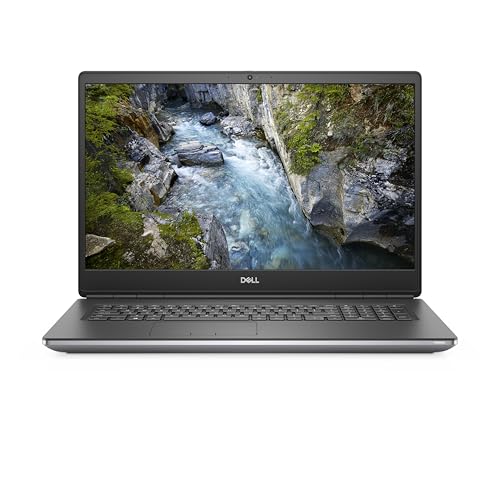
This pick suits guests that need memory and graphics memory more than the newest processor. It has a 16-core Intel Core i7-12850HX processor that runs up to 4.80 GHz, 64GB of RAM, a 512GB SSD, and NVIDIA RTX A4500 graphics with 16GB of graphics memory. The 17.3-inch FHD display has a resolution of 1920 by 1080 and is described as anti-glare with 500-nits brightness. It runs Windows 11 Pro and includes Wi-Fi 6E and Bluetooth. The 64GB of RAM lets you run several guests with generous memory, or two large guests without starving the host. The main limit is storage: a 512GB SSD fills up quickly, so plan for external storage and confirm the storage size on the listing.
Pros
- 64GB of RAM suits several guests or two large guests
- NVIDIA RTX A4500 graphics with 16GB of graphics memory
- 16-core processor with strong single-core speed
- Bright anti-glare 17.3-inch FHD display
Cons
- 512GB SSD fills up quickly with several guest images
- Fewer processor cores than the 13th generation models here
- Confirm the exact storage and memory configuration on the listing
Dell Precision 7780 Mobile Workstation, Intel Core i9-13950HX — Best for maximum processor power
This is the most powerful processor in this guide: a 24-core Intel Core i9-13950HX, with 64GB of RAM, a 1TB SSD, and NVIDIA RTX 4000 Ada graphics with 12GB of graphics memory. The 17.3-inch FHD display has a resolution of 1920 by 1080 and is described as anti-glare with 500-nits brightness. It runs Windows 11 Pro and includes Wi-Fi 6E and Bluetooth. The 24-core processor can host many guests at once, with cores to spare for the host, and it handles parallel workloads such as builds and simulations. It needs good cooling and a power adapter during heavy lab sessions. Confirm the exact configuration on the listing.
Pros
- 24-core processor is the strongest in this guide for many guests
- 64GB of RAM and a 1TB SSD suit a larger lab
- NVIDIA RTX 4000 Ada graphics with 12GB of graphics memory
- Bright anti-glare 17.3-inch FHD display
Cons
- A powerful workstation needs cooling and power during heavy sessions
- FHD display shows less detail than the UHD display in this guide
- Confirm the exact configuration on the listing before you buy
Lenovo ThinkPad P17 G2, Intel Core i7-11850H — Best for lighter lab work

This entry point suits lighter virtual machine work. It has an 8-core Intel Core i7-11850H processor, 32GB of DDR4 RAM, a 1TB SSD, and NVIDIA RTX A3000 graphics with 6GB of graphics memory. The 17.3-inch FHD display has a resolution of 1920 by 1080. It runs Windows 10 Pro and includes Wi-Fi 6 and Bluetooth. The listing gives the model number as 20YU001RUS. It suits a training lab or a small test environment with one or two guests running at a time. The main limit is the processor: with 8 cores, give each guest two virtual cores and avoid running many guests at once. Confirm the exact configuration on the listing.
Pros
- 32GB of RAM and a 1TB SSD suit a small lab
- NVIDIA RTX A3000 workstation graphics with 6GB of graphics memory
- Large 17.3-inch FHD display for guest consoles
- Good keyboard for long command-line sessions
Cons
- 8-core processor limits how many guests can run at once
- Windows 10 Pro is older than Windows 11 Pro on the Dell picks
- Confirm the exact configuration on the listing before you buy
Who Should Choose What
Choose the Dell Precision 7780 with the Intel Core i7-13850HX if you want a balanced modern workstation for most virtual machine work. It is the best starting point for a home lab or a portable training setup.
Choose the Dell Precision 7770 with the Intel Core i7-12850HX if your guests need memory and graphics memory more than the newest processor. It suits large Windows guests and guests with CAD tools, if you are willing to manage a smaller SSD.
Choose the Dell Precision 7780 with the Intel Core i9-13950HX if you run many guests at once or guests with parallel workloads. It suits developers and lab builders who need the most processor cores in this guide.
Choose the Lenovo ThinkPad P17 G2 if your lab is small and your guests are light. It suits students and trainers who run one or two guests at a time. If you are still unsure, begin with memory: count your guests, add up the memory each guest needs, add memory for the host, and choose the machine that covers that total with room to spare.
Common Mistakes
Buying for one guest and forgetting the host. Always add host memory to your guest total, and leave a margin for the hypervisor and background services.
Giving every guest too many virtual cores. Begin with two virtual cores per guest, add more only when a guest is clearly processor bound, and keep cores in reserve for the host.
Filling a small SSD with guest images. Guest disk images grow over time, especially when you take snapshots. Keep unused images on external storage, delete old snapshots, and choose a 1TB SSD if you keep many guests.
Ignoring the graphics card when guests need it. A guest that runs CAD, rendering, or GPU-accelerated tools needs a workstation graphics card with enough graphics memory. Check the graphics memory on the listing and match it to your guests.
Assuming every configuration with the same model name is the same. Always read the full listing and confirm the exact configuration before you buy.
Running a full lab on battery power. Use the power adapter during lab sessions, keep the machine ventilated, and avoid blocking the air vents.
Skipping backups. Keep a copy of each guest image on external storage or a network share, and test that you can restore it.
FAQ
How much RAM do I need for virtual machines on a 17-inch mobile workstation?
It depends on how many guests you run at once and how much memory each guest needs. A host with 32GB of RAM suits a small lab with one or two modest guests. A host with 64GB of RAM suits a larger lab with several guests or two large guests. Add up the memory for each guest, add memory for the host, and leave a margin. If your total is close to 32GB, choose a 64GB machine.
Is a 17-inch screen better than a smaller screen for virtual machines?
Yes, for most lab work. A 17.3-inch screen gives you room to run a guest console, a terminal, documentation, and monitoring tools side by side. A smaller screen forces you to switch windows constantly, which slows you down.
Do I need a workstation graphics card for virtual machines?
It depends on what your guests do. Server guests, network labs, and test guests usually do not need a powerful graphics card. Guests that run CAD, 3D rendering, video work, or GPU-accelerated tools do need a workstation graphics card with enough graphics memory. The picks here all have professional workstation graphics, with 6GB to 16GB of graphics memory depending on the model.
Can I run Linux guests on a Windows host?
Yes. Common hypervisors on Windows support Linux guests, and the workstations in this guide have the processor features needed for virtualization. Check that your hypervisor supports your chosen Linux distribution, and check driver support if you plan to run Linux as the host instead.
How many virtual machines can a 17-inch mobile workstation run?
It depends on the processor cores, memory, and storage. A workstation with 32GB of RAM and 8 cores can run one or two modest guests comfortably. A workstation with 64GB of RAM and 20 or 24 cores can run four or five modest guests, or two large guests, at the same time. Begin with fewer guests, watch memory and processor use, and add guests only when the host still has room.
Should I choose a newer processor or more RAM?
Choose more RAM first if your guests are memory hungry, because a host that runs out of memory slows down every guest. Choose a newer processor with more cores first if you run many guests at once or guests with parallel workloads. The best overall pick here balances both, with a 20-core processor and 32GB of RAM, while the 64GB picks suit people who need more memory above all else.
Conclusion
The best 17-inch mobile workstation for virtual machines is the Dell Precision 7780 Mobile Workstation with the Intel Core i7-13850HX processor, 32GB of DDR5 RAM, a 1TB SSD, and NVIDIA RTX 3500 Ada graphics. It balances a modern 20-core processor, enough memory for a small to medium lab, and the sharpest display in this guide.
The runner-up is the Dell Precision 7770 Mobile Workstation with the Intel Core i7-12850HX processor, 64GB of RAM, and NVIDIA RTX A4500 graphics. Choose it if your guests need more memory and more graphics memory than the best overall pick provides, and you are willing to manage a smaller SSD. Whichever pick you choose, confirm the exact configuration on the listing, count your guests and their memory needs before you buy, and keep your guest images backed up.
More from Amazon
Programs that pair well with the guide above. Offers and eligibility are set by Amazon and may change.
Free shipping on eligible items, Prime Video and more. Eligible new members can start with a free trial.
Start a Prime free trialA Prime membership for ages 18-24 with a trial period. Eligibility is set by Amazon.
See Prime for Young AdultsAudiobooks and podcasts to listen to on the go. Eligible new members can start with a free trial.
Try Audible freeAd-free music streaming. Eligible new subscribers can start with a free trial.
Try Music Unlimited freeAs an Amazon Associate we earn from qualifying purchases.






Write Your Review
No reviews yet. Be the first to share your experience!