

Key takeaways
- Compare five 15.6 and 16 inch mobile workstations from the ThinkPad P, Precision and ZBook lines on processors, RTX graphics, memory and studio ports.
A home production studio asks a laptop to do two jobs that fight each other: hold a heavy video timeline, a DAW session or a 3D scene without stalling, and do it on a desk that also holds monitors, an interface and a control surface. The real decision is not raw speed on paper. It is whether the machine pairs a high-core-count processor with a certified professional graphics card, enough memory for large project files, and ports that let it dock into a studio setup without a tangle of adapters.
This guide serves video editors cutting long-form work at home, music producers running sample-heavy sessions, and 3D or motion-design freelancers who need workstation-class hardware in a 15-inch footprint. Every machine below is a mobile workstation sold on Amazon US, picked from the processor, graphics, memory and display details printed on its own product page, across the ThinkPad P, Dell Precision and HP ZBook lines.
Quick Picks
As an Amazon Associate we earn from qualifying purchases
| Product | Best for | Key spec from title |
|---|---|---|
| Lenovo ThinkPad P15 Gen 2 | A traditional 15.6-inch build for heavy timelines | Intel Xeon W-11855M with 32 GB RAM and 1 TB SSD |
| Lenovo ThinkPad P16 Gen 2 | The sharpest screen for detailed edit work | 16-inch WQXGA 2560 x 1600 display, Core i7-13700HX |
| HP ZBook Power G9 | A first step into the ISV-certified ZBook line | Core i7-12800H with NVIDIA T600 graphics |
| Dell Precision 3581 | Balanced memory and graphics for mixed studio work | Core i7-13800H vPro, 32 GB DDR5, RTX A1000 |
| Dell Precision 7680 | Maximum memory and storage in this group | 64 GB DDR5 CAMM RAM with a 2 TB NVMe SSD |
How to Choose
Match the Processor to Your Heaviest Project
Studio software rewards core counts in different ways. Timeline rendering and 3D scene building scale across many cores, while audio sessions lean on fast single-core response when tracking with plug-ins live. The listings here span a six-core Xeon W-11855M in the ThinkPad P15 Gen 2 up to the 20-core Core i7-13850HX in the Precision 7680, with 14- and 16-core chips in between. Count the cores on the exact configuration you are buying, because each of these model lines sells in several processor tiers under similar names.
Professional Graphics Are About Certified Drivers
A mobile workstation earns its name through its graphics card and the drivers behind it. The NVIDIA T600, RTX A1000, RTX A2000 and RTX 1000 Ada cards in these listings belong to NVIDIA’s professional range, built for stability in editing, CAD and 3D applications rather than gaming frame rates. For a home studio, that means GPU-accelerated effects and renders with drivers tested against professional software. Check the exact card named in the listing title, since a single model line can ship with several different graphics options at different levels.
Memory and Storage Decide How Big a Session Feels
Sample libraries, 4K footage and layered project files punish small configurations. Listings here start at 16 GB of RAM and a 512 GB SSD in the ZBook Power G9 and climb to 64 GB of DDR5 CAMM memory with a 2 TB SSD in the Precision 7680. For most home studios, 32 GB is the comfortable middle ground for large timelines. Also look at whether the memory type is standard DDR5 you can upgrade later, or a CAMM module like the Dell uses, which changes how a future upgrade works.
Ports Decide How the Laptop Joins Your Studio
A studio laptop rarely works alone. It feeds external monitors, an audio interface, control surfaces and backup drives, often all at once. The Precision 7680 listing spells out two Thunderbolt 4 ports, HDMI, Ethernet and USB-A connections, which covers most home studio desks without a dock. Other listings are thinner on published port detail, so confirm the port list on the product page before assuming a Thunderbolt dock, a second monitor and wired networking will all connect the way your current setup expects.
The 5 Best Options
Lenovo ThinkPad P15 Gen 2

The ThinkPad P15 Gen 2 is the old-school entry in this group: a 15.6-inch workstation built around an Intel Xeon W-11855M processor and an NVIDIA RTX A2000 graphics card. That pairing suits editors and 3D artists whose home studios run long renders and dense timelines, and who prefer the P series’ traditional full-size chassis. With 32 GB of memory and a 1 TB SSD in this configuration, it holds large project libraries locally, and the Full HD panel keeps the focus on an external monitor for detailed colour work.
Specs
- Display: 15.6-inch Full HD, 1920 x 1080
- Processor: Intel Xeon W-11855M, hexa-core, 3.20 GHz
- Memory: 32 GB RAM
- Storage: 1 TB SSD
- Graphics: NVIDIA RTX A2000, up to 4 GB discrete graphics
- Colour: Black
- Model: 20YQ0046US
Best for: Video and 3D work in a classic 15.6-inch workstation chassis with Xeon power.
Watch out for: New-offer availability on this listing looked limited at the time of checking, so confirm the offer is a new unit in the exact 20YQ0046US configuration before ordering.
ASIN: B09CQB9MWN
Lenovo ThinkPad P16 Gen 2

Where the P15 is traditional, the ThinkPad P16 Gen 2 is the screen-first option. Its 16-inch WQXGA panel packs 2560 x 1600 pixels, noticeably more working room for timeline tracks, mixer channels and node graphs than the Full HD screens elsewhere here. Underneath sits a 16-core Intel Core i7-13700HX with 32 GB of DDR5 memory and a 1 TB SSD, a combination aimed at editors and designers who keep several heavy applications open at once and want the laptop’s own display to stay useful even away from a desk monitor.
Specs
- Display: 16-inch WQXGA, 2560 x 1600
- Processor: Intel Core i7-13700HX, 16 cores
- Memory: 32 GB DDR5 RAM
- Storage: 1 TB SSD
- Colours: Villi Black, Storm Gray
- Model: 21FA002XUS
Best for: Editors and designers who want a high-resolution built-in display for detailed work.
Watch out for: The Amazon listing title does not name the graphics card for this configuration, and the P16 sells in many GPU tiers, so verify the exact graphics option on the product page before buying.
ASIN: B0CH79JMCL
HP ZBook Power G9

The ZBook Power G9 is HP’s entry rung into certified workstation hardware, and for a smaller home studio that can be exactly the right rung. Its Core i7-12800H and NVIDIA T600 graphics handle audio production, photo work and 1080p-to-4K video editing in professional applications with certified drivers, while the 15.6-inch Full HD screen keeps the machine in the standard 15-inch class. The trade-offs sit in the configuration: 16 GB of memory and a 512 GB SSD are workable starting points rather than long-term answers for a growing media library.
Specs
- Display: 15.6-inch Full HD, 1920 x 1080
- Processor: Intel Core i7-12800H
- Memory: 16 GB RAM
- Storage: 512 GB SSD
- Graphics: NVIDIA T600
Best for: Smaller home studios moving up to ISV-certified hardware for audio and video work.
Watch out for: A buyer question on the listing disputes whether the graphics are the NVIDIA T600 or integrated Intel Iris Xe, so confirm with the seller that the unit ships with the T600 as titled.
ASIN: B0B4PMFGHF
Dell Precision 3581

Dell’s Precision 3581 takes the balanced route. The listing pairs a Core i7-13800H with vPro management support, 32 GB of DDR5 memory and an NVIDIA RTX A1000 graphics card, which lands it squarely in the middle of this group for mixed studio work: video editing in the morning, a 3D render or a large multitrack session after. Nothing in the configuration is extreme, and that is the appeal for a home studio that needs one machine to behave predictably across several kinds of production software every day.
Specs
- Display: 15.6-inch, 1920 x 1080
- Processor: Intel Core i7-13800H with vPro
- Memory: 32 GB DDR5 RAM
- Storage: 512 GB SSD
- Graphics: NVIDIA RTX A1000
- Operating system: Windows 11 Pro
- Model: PRM3581XYC33
Best for: Mixed video, audio and 3D workloads that need a balanced, current-generation configuration.
Watch out for: The 512 GB SSD fills quickly with footage and sample libraries, so budget for external or added storage, and confirm the seller’s configuration matches the listed 32 GB of memory.
ASIN: B0BBKP1D3T
Dell Precision 7680
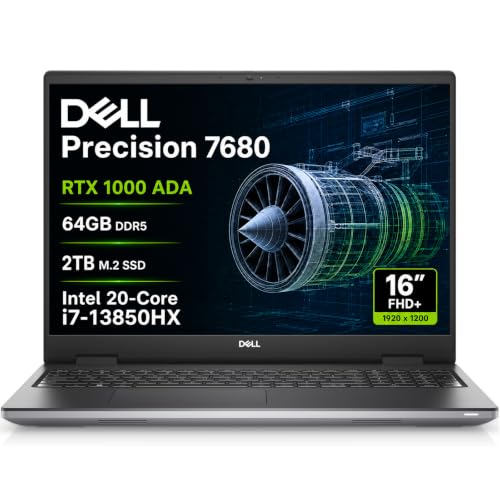
The Precision 7680 is the heavy lifter here, a 16-inch flagship workstation for studios whose projects have outgrown mid-range hardware. Its listing combines a 20-core Core i7-13850HX and an NVIDIA RTX 1000 Ada card with 6 GB of graphics memory, 64 GB of DDR5 CAMM memory and a 2 TB NVMe SSD, plus the fullest port selection in this roundup, including dual Thunderbolt 4 and Ethernet. For a home studio built around one machine driving several monitors and peripherals, this is the configuration with the most headroom in every direction.
Specs
- Display: 16-inch FHD+, 1920 x 1200, anti-glare
- Processor: Intel Core i7-13850HX vPro, 20 cores
- Graphics: NVIDIA RTX 1000 Ada, 6 GB
- Memory: 64 GB DDR5 CAMM, 5200 MHz
- Storage: 2 TB PCIe NVMe M.2 SSD
- Ports: 2x Thunderbolt 4, USB-C, 2x USB-A, HDMI, Ethernet
- Wireless: Wi-Fi 6E, Bluetooth 5.2
- Operating system: Windows 11 Pro
Best for: Large 4K, 3D and multitrack projects that need maximum memory, storage and ports.
Watch out for: The listing’s own disclosure states the seller resealed this unit to upgrade the SSD, with Dell ProSupport covering the remaining components, so read the warranty terms carefully before ordering.
ASIN: B0FJ22ZTMQ
Which One Fits Your Situation
You Cut Long-Form Video at a Desk With External Monitors
Start with the ThinkPad P15 Gen 2 or the Dell Precision 3581. Both pair a strong processor with an RTX A-series card and 32 GB of memory, so timelines stay responsive while a desk monitor handles colour-critical viewing. The Dell adds a newer processor generation; the Lenovo counters with double the internal storage for active projects.
You Produce Music With Large Sample Libraries
Look at the Precision 7680 first. Its 64 GB of memory and 2 TB SSD give sample libraries and multitrack sessions the most room to breathe, and its Ethernet port suits a wired studio network. If that is more machine than your sessions need, the Precision 3581 keeps 32 GB of memory in a smaller configuration.
You Edit and Design on the Laptop Screen Itself
The ThinkPad P16 Gen 2 is built for this. Its 2560 x 1600 display shows more timeline and canvas at once than any Full HD option here, which matters when there is no external monitor to lean on. Just confirm the graphics configuration on the listing, since the title leaves that detail open.
Your Studio Is Growing Into Professional Software
The ZBook Power G9 is the sensible first step. It brings certified professional graphics and a capable processor at the entry end of the workstation lines, which covers audio work, photo editing and moderate video projects. Plan a memory and storage upgrade path as your library grows beyond its starting configuration.
Common Mistakes
- Buying by model name alone, when the same workstation line sells with several processors, graphics cards and memory sizes under near-identical titles.
- Assuming a listing includes a professional graphics card without checking the exact GPU named in the title or technical details.
- Choosing 16 GB of memory for sample libraries or 4K timelines, then discovering the configuration cannot be upgraded the way you expected.
- Ignoring the port list, then finding a dock, second monitor, audio interface and wired network cannot all connect at once.
- Overlooking seller disclosures on marketplace listings, such as resealed units with upgraded storage and split warranty coverage.
Frequently Asked Questions
Are these workstations better for a home studio than a gaming laptop?
For professional production software, generally yes. These machines use NVIDIA professional graphics cards with drivers certified for editing, CAD and 3D applications, which favours stability during long renders and sessions. A gaming laptop may post higher frame rates, but its drivers are tuned and tested for games rather than studio tools.
Is 32 GB of memory enough for video editing and music production?
For most home studios, yes. It handles 4K timelines, layered photo work and sizeable sample libraries without constant swapping, and three of the five listings here ship with exactly that. Step up to the 64 GB Precision 7680 if you routinely keep an editor, a DAW and a 3D application open together.
Does a 16-inch model still count as a 15-inch class workstation?
In practice, yes. The 16-inch models here keep roughly the footprint of older 15.6-inch workstations while fitting a taller 16:10 screen, so they sit on the same desks and in the same bags. What changes is weight and screen area, so check the dimensions on the listing if your studio desk or travel bag is tight.
What should I verify before ordering a workstation from a marketplace listing?
Confirm the exact configuration: processor model, graphics card, memory size and storage, since one model line covers many builds. Then read the seller’s disclosure for resealed or upgraded units and check what warranty covers which parts. Finally, confirm the offer is a new unit rather than a renewed one if that matters to you.
More from Amazon
Programs that pair well with the guide above. Offers and eligibility are set by Amazon and may change.
Free shipping on eligible items, Prime Video and more. Eligible new members can start with a free trial.
Start a Prime free trialA Prime membership for ages 18-24 with a trial period. Eligibility is set by Amazon.
See Prime for Young AdultsAudiobooks and podcasts to listen to on the go. Eligible new members can start with a free trial.
Try Audible freeAd-free music streaming. Eligible new subscribers can start with a free trial.
Try Music Unlimited freeAs an Amazon Associate we earn from qualifying purchases.





Write Your Review
No reviews yet. Be the first to share your experience!