

Key takeaways
- Compare 5 touchscreen mobile workstations for professional multitasking, from compact 14-inch models to 16-inch OLED powerhouses with pro graphics.
A touchscreen mobile workstation has to do two jobs at once: run demanding professional software without slowing down, and let you work directly on the screen when a mouse feels slow. The real decision is not simply how fast the processor runs. It is how the touchscreen, the graphics hardware, the memory, and the port selection fit the way you actually work, whether that means annotating drawings, scrubbing timelines, or keeping a dozen applications open across several monitors.


This guide covers five touchscreen mobile workstations chosen from the names and specifications on their Amazon product pages, for engineers, designers, analysts, and content creators who multitask for a living. Some are compact 14-inch machines built for travel, while others are 16-inch powerhouses with workstation graphics and OLED displays. Read the sections in order to match a machine to your workload, or jump straight to the shortlist if you already know what you need.
Quick Picks
As an Amazon Associate we earn from qualifying purchases
| Product | Best for | Key spec from title |
|---|---|---|
| HP ZBook Power 16 G11 | All-round professional multitasking | 16-inch FHD+ Touchscreen, 32GB DDR5, 1TB SSD |
| HP ZBook Firefly 14 G11 | Lightweight travel with heavy memory | 14-inch FHD+ Touchscreen, 64GB DDR5, 2TB SSD |
| Lenovo ThinkPad P14s Gen 6 | Compact OLED color work | 14-inch OLED 2.8K Touchscreen, 64GB DDR5, 1TB SSD |
| Lenovo ThinkPad P16 Gen 3 | Maximum power and huge datasets | 16-inch 3.2K OLED Touchscreen, 128GB DDR5, 4TB SSD |
| Dell Precision 7680 | CAD and 3D work with pro graphics | 16-inch OLED 4K UHD+ Touchscreen, RTX 1000 Ada, 32GB DDR5 |
How to Choose
Match the graphics to the software you run
Workstation graphics matter when your software uses the GPU for rendering, simulation, or real-time viewport work. A machine with an NVIDIA RTX Ada or RTX PRO GPU is built for CAD, 3D modeling, and GPU-driven rendering, while built-in graphics handle office suites, browsers, and lighter design tools without trouble. Check whether your main applications list workstation GPUs among their supported hardware, because certified drivers can prevent crashes and display glitches that consumer drivers do not. If you mostly run spreadsheets, email, and video calls alongside one design tool, built-in graphics with plenty of memory may serve you better than a heavier machine with a GPU you rarely use.
Memory and storage for heavy multitasking
Professional multitasking eats memory faster than most buyers expect, especially when you keep a CAD model, a browser full of tabs, a video call, and a spreadsheet open at the same time. Thirty-two gigabytes of DDR5 is a sensible floor for this kind of work, and 64GB or more makes sense if you run virtual machines, large assemblies, or several memory-hungry applications side by side. Storage matters too: a 1TB SSD leaves room for project files and applications, while 2TB or 4TB suits people who carry large media libraries or datasets locally. Look for PCIe NVMe storage, which keeps large files opening quickly instead of leaving you waiting on the drive.
Touchscreen quality and pen support
Not every touchscreen suits professional work, so look past the word touch and check the panel itself. Resolution decides how much detail you can see at once: a 2.8K or 4K panel shows fine lines and small text more clearly than a standard full HD screen, which matters for drawings and photo editing. Brightness matters when you work near windows or outdoors, and an anti-glare coating helps in the same situations. An OLED panel gives deep contrast that suits color-sensitive work, while a stylus-compatible screen lets you sketch, mark up documents, and sign files directly. Confirm stylus support on the product page before buying, since some touchscreens accept finger input only.
Ports, docking, and desk setup
A mobile workstation earns its keep at the desk as well as on the road, so count the ports before you commit. Thunderbolt 4 or Thunderbolt 5 ports let you drive several external monitors and a dock through one cable, which turns a laptop into a full workstation when you sit down. HDMI and USB-A ports matter for projectors, legacy peripherals, and external drives, and an Ethernet port helps with large file transfers in the office. Check how many external monitors the machine supports and at what resolution, because that number decides whether your multi-screen setup works. A machine with the right ports saves you from buying adapters and hubs later.
The 5 Best Options
HP ZBook Power 16 G11
The ZBook Power 16 G11 is the most balanced machine on this list, pairing a 16-inch touchscreen with a six-core AMD Ryzen 5 processor, 32GB of DDR5 memory, and a 1TB SSD. Its ISV certifications cover professional applications such as AutoCAD, SolidWorks, and MATLAB, so engineers and analysts can trust it with the software their work depends on. Two Thunderbolt 4 ports, HDMI 2.1, and Ethernet make it easy to connect three external monitors at a desk, and the 5MP webcam with facial recognition suits video calls between site visits. It is a sensible pick when you want one machine for office work, fieldwork, and everything in between.
Specs
- 16-inch WUXGA (1920 x 1200) IPS touch display, UWVA, anti-glare, 300 nits
- AMD Ryzen 5 8645HS processor, up to 5.0 GHz, 6 cores, 12 threads
- 32GB DDR5-4800 MHz RAM, 1TB PCIe NVMe M.2 SSD
- AMD Radeon Graphics (built-in)
- 2x Thunderbolt 4, 2x USB-A 3.2 Gen 1, HDMI 2.1, Ethernet (RJ-45), SD card reader
- Windows 11 Pro 64-bit, 5MP RGB+IR webcam
Best for: Professionals who want one touchscreen workstation for office, desk, and field work.
Watch out for: Confirm it is still sold before buying, since availability of this configuration changes. The listing notes the machine was resealed to upgrade memory and storage, so check the warranty terms for upgraded parts.
HP ZBook Firefly 14 G11
The Firefly 14 G11 is the travel-friendly option here, at 3.1 pounds while still carrying 64GB of DDR5 memory and a 2TB SSD. Its 14-inch touchscreen reaches 800 nits with sRGB color coverage and anti-glare, which keeps the display readable in bright rooms and near windows. The AMD Ryzen 7 8840HS processor with Radeon 780M graphics handles demanding multitasking, and two Thunderbolt 4 ports support a multi-monitor desk setup when you get home. Engineers and designers who fly often will appreciate a workstation that fits easily in a bag without giving up memory or storage.
Specs
- 14-inch WUXGA touch display, 800 nits, 16:10, sRGB color, anti-glare, multi-touch
- AMD Ryzen 7 8840HS processor, up to 5.1 GHz, 8 cores, 16 threads
- 64GB DDR5 RAM, 2TB PCIe NVMe SSD
- AMD Radeon 780M Graphics
- 2x Thunderbolt 4, 2x USB-A, HDMI 2.0, headphone and microphone combo
- Windows 11 Pro 64-bit, 3.1 lb
Best for: Frequent travelers who need heavy memory and storage in a light 14-inch machine.
Watch out for: Confirm it is still sold before buying, since availability of this configuration changes. The listing notes the machine was resealed to upgrade the SSD, so check the warranty terms for the upgraded part.
Lenovo ThinkPad P14s Gen 6
The ThinkPad P14s Gen 6 pairs a compact 14-inch body with a 2.8K OLED touchscreen, which makes it the strongest choice on this list for color-sensitive work in a small package. The OLED panel supports Dolby Vision with a variable refresh rate from 30 to 120Hz, so motion stays smooth whether you are scrolling documents or presenting work. Inside, the AMD Ryzen AI 7 PRO 350 processor and 64GB of DDR5 memory keep large projects moving, and the 1TB SSD holds a working set of files. It suits designers, photographers, and analysts who want a vivid touchscreen without carrying a 16-inch machine.
Specs
- 14-inch OLED 2.8K (2880 x 1800) Dolby Vision touchscreen, VRR 30-120Hz
- AMD Ryzen AI 7 PRO 350 processor, up to 5.0 GHz, 8 cores
- 64GB DDR5 memory, 1TB SSD
- AMD Radeon 860M graphics
- Windows 11 Pro, Copilot+ PC
- Item model number 21QL Ryzen AI 7 PRO 350
Best for: Designers and analysts who want a vivid OLED touchscreen in a compact 14-inch body.
Watch out for: Confirm it is still sold before buying, since availability of this configuration changes. Check the exact storage size on the listing, because the same model number appears with several SSD options.
Lenovo ThinkPad P16 Gen 3
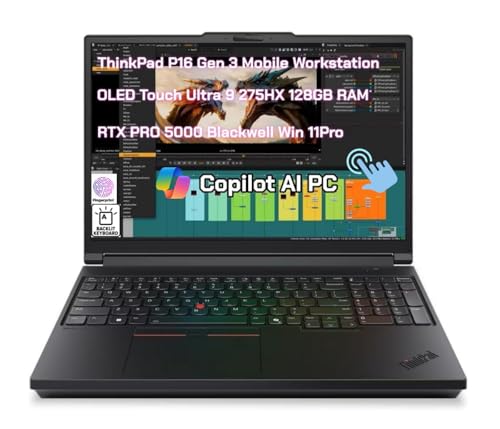
The ThinkPad P16 Gen 3 is the most powerful machine here, built for workloads that overwhelm ordinary laptops. Its 16-inch 3.2K OLED touchscreen pairs with an Intel Core Ultra 9 275HX processor with 24 cores, 128GB of DDR5 memory, and a 4TB SSD, so huge datasets and complex assemblies stay in memory without swapping. The NVIDIA RTX PRO 5000 Blackwell laptop GPU with 24GB of GDDR7 memory handles real-time ray tracing and faster rendering, while Thunderbolt 5 supports fast docks and high-resolution external monitors. This is the pick for engineers and creators whose projects genuinely need desktop-class power on the move.
Specs
- 16-inch 3.2K (3200 x 2000) OLED touchscreen, Dolby Vision
- Intel Core Ultra 9 275HX processor, 24 cores
- 128GB DDR5 RAM, 4TB SSD Gen5
- NVIDIA RTX PRO 5000 Blackwell Laptop GPU, 24GB GDDR7
- Thunderbolt 5, Ethernet, HDMI, USB, Wi-Fi
- Windows 11 Pro, 5MP RGB+IR camera, fingerprint reader, numeric keypad
Best for: Engineers and creators running huge datasets, complex assemblies, and GPU rendering on the move.
Watch out for: Confirm it is still sold before buying, since availability of this configuration changes. At 5.6 pounds it is the heaviest machine here, so check that it fits your bag and your travel routine.
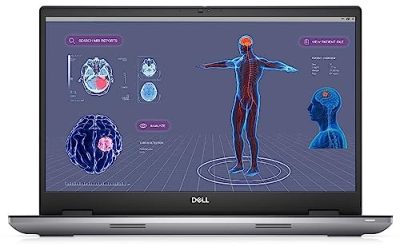
Dell Precision 7680
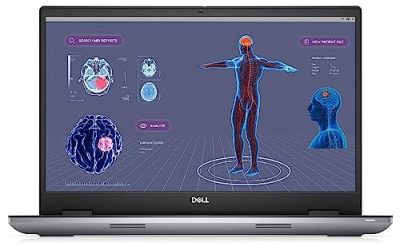
The Dell Precision 7680 brings a 16-inch OLED 4K UHD+ touchscreen to CAD and 3D work, with the NVIDIA RTX 1000 Ada GPU providing workstation-class graphics in a 6GB package. Its Intel Core i5-13600HX processor has 14 cores, and 32GB of DDR5 memory with a 1TB PCIe NVMe SSD keeps multitasking smooth across design tools, browsers, and communication apps. The display covers the DCI-P3 color gamut at 400 nits, which suits visual work, and support for up to four external monitors at 4K makes it a strong desk machine too. Two Thunderbolt 4 ports, USB-C, USB-A, HDMI, and Ethernet cover most docking needs.
Specs
- 16-inch 4K UHD+ (3840 x 2400) OLED touchscreen, anti-glare, DCI-P3 color gamut, 400 nits
- Intel Core i5-13600HX vPro processor, up to 4.8 GHz, 14 cores
- 32GB DDR5 CAMM RAM, 1TB PCIe NVMe M.2 SSD
- NVIDIA RTX 1000 Ada 6GB GPU
- 2x Thunderbolt 4, USB-C, 2x USB-A, HDMI, Ethernet, audio combo jack
- Windows 11 Pro 64-bit, 1080p FHD IR webcam with privacy shutter
Best for: CAD and 3D professionals who want a high-resolution OLED touchscreen with workstation graphics.
Watch out for: Confirm it is still sold before buying, since availability of this configuration changes. The listing notes the machine was resealed to upgrade the SSD, so check the warranty terms for the upgraded part.
Which One Fits Your Situation
For engineers running CAD and simulation software
Choose the Dell Precision 7680 when your daily work centers on CAD, 3D modeling, or simulation. The RTX 1000 Ada GPU and the 4K OLED touchscreen give you workstation graphics with a display sharp enough for fine detail, and the Precision line carries ISV certifications for professional applications. If your models grow very large, step up to the ThinkPad P16 Gen 3 for its 128GB of memory and stronger GPU.
For designers who need accurate color on the go
Choose the Lenovo ThinkPad P14s Gen 6 when color accuracy matters and you travel light. Its 2.8K OLED touchscreen with Dolby Vision shows rich contrast and vivid color in a compact 14-inch body, and 64GB of memory handles large design files. If you want a larger canvas for the same kind of work, the Dell Precision 7680 offers a 16-inch OLED panel with a wider color gamut.
For heavy multitaskers with huge datasets
Choose the Lenovo ThinkPad P16 Gen 3 when your work involves massive datasets, virtual machines, or several demanding applications running at once. With 128GB of DDR5 memory, a 4TB SSD, and a 24-core processor, it keeps large workloads in memory instead of slowing down. The HP ZBook Firefly 14 G11 is the lighter alternative, with 64GB of memory and a 2TB SSD in a travel-sized body.
For professionals who travel constantly
Choose the HP ZBook Firefly 14 G11 when weight matters most. At 3.1 pounds, it is the lightest machine on this list, yet it still carries 64GB of memory, a 2TB SSD, and a bright 800-nit touchscreen. The ThinkPad P14s Gen 6 is the other compact option, trading some brightness for an OLED panel that suits visual work better.
Common Mistakes
- Buying a workstation without checking that the exact configuration has a touchscreen, since many models sell in both touch and non-touch versions.
- Choosing built-in graphics for GPU-heavy software such as 3D rendering or simulation, then finding the machine cannot keep up.
- Settling for 16GB of memory when your workflow keeps CAD, browsers, and video calls open together, which leads to slowdowns.
- Ignoring the port list and discovering too late that the machine cannot drive your external monitors at full resolution.
- Assuming every touchscreen supports a stylus, when some panels accept finger input only and leave pen users disappointed.
Frequently Asked Questions
Do I need a workstation GPU for professional multitasking?
Not always. Built-in graphics handle office suites, browsers, video calls, and lighter design tools without trouble. A workstation GPU such as an NVIDIA RTX Ada or RTX PRO matters when your software uses the GPU for rendering, simulation, or real-time 3D viewports. Check the supported hardware list for your main applications before deciding, because certified drivers can prevent crashes that consumer graphics do not.
How much memory does a touchscreen mobile workstation need?
Thirty-two gigabytes of DDR5 is a sensible floor for professional multitasking, covering CAD, browsers, and communication apps running together. Move to 64GB if you work with large assemblies, virtual machines, or several memory-hungry tools at once, and consider 128GB only when your datasets genuinely demand it. More memory helps multitasking more than a faster processor in many everyday workloads.
Can a touchscreen mobile workstation replace a desktop?
For many professionals it can, especially with a Thunderbolt dock and external monitors at the desk. The machines on this list support several external displays and carry workstation-class processors and memory, so they handle the same workloads as a desktop. The trade-off is thermal headroom: a desktop still wins for sustained rendering or simulation that runs at full load for hours.
Is an OLED touchscreen better than an IPS touchscreen?
OLED panels offer deeper contrast and vivid color, which suits photo editing, video work, and design. IPS panels with high brightness, such as the 800-nit display on the Firefly 14 G11, suit bright offices and outdoor use better. Either technology works well for general professional use, so choose based on whether color depth or brightness matters more for your working environment.
More from Amazon
Programs that pair well with the guide above. Offers and eligibility are set by Amazon and may change.
Free shipping on eligible items, Prime Video and more. Eligible new members can start with a free trial.
Start a Prime free trialA Prime membership for ages 18-24 with a trial period. Eligibility is set by Amazon.
See Prime for Young AdultsAudiobooks and podcasts to listen to on the go. Eligible new members can start with a free trial.
Try Audible freeAd-free music streaming. Eligible new subscribers can start with a free trial.
Try Music Unlimited freeAs an Amazon Associate we earn from qualifying purchases.



Write Your Review
No reviews yet. Be the first to share your experience!