

Key takeaways
- Compare the best 15-inch mobile workstations for video editing, with certified GPUs, colour-accurate displays and sustained power for 4K timelines.
As an Amazon Associate we earn from qualifying purchases
Video editing punishes the wrong laptop. Playback stutters when the GPU runs out of memory, exports crawl when the CPU throttles after ten minutes, and a washed-out panel makes colour grading guesswork. The best 15-inch mobile workstations for video editing solve those problems with certified professional graphics, cooling built for sustained loads, and displays that can actually be trusted for colour work. This guide compares four 15.6-inch workstation-class laptops from Lenovo, HP and Dell, explains what separates a real mobile workstation from a gaming laptop in disguise, and matches each machine to a different kind of editing workload.
Quick Picks
| Product | Best for | Key spec |
|---|---|---|
| Lenovo ThinkPad P15 Gen 2 (20YQ003JUS) | Colour-critical 4K work | 15.6-inch 4K UHD display, RTX A2000 |
| HP ZBook Fury 15 G8 | GPU-heavy timelines and effects | RTX A3000 with 6 GB GDDR6 |
| Dell Precision 3571 | Newer CPU platform in a lighter chassis | Core i7-12800H, 32 GB DDR5 |
| Lenovo ThinkPad P15v Gen 3 | Value workstation for HD and light 4K | Core i7-12700H, NVIDIA T1200 |
How to Choose a 15-Inch Mobile Workstation for Video Editing
Certified workstation GPUs versus gaming GPUs
Every machine in this roundup uses an NVIDIA professional GPU from the RTX A-series or T-series rather than a GeForce gaming card. That distinction matters for editors in two ways. First, professional GPUs ship with ISV-certified drivers, meaning the driver branch is validated against professional applications and prioritises stability over frame rates. Second, editing software such as DaVinci Resolve, Premiere Pro and After Effects leans on GPU memory for effects, noise reduction and high-resolution playback, so VRAM capacity is often the real ceiling on a timeline. A 4 GB card handles HD and straightforward 4K work; 6 GB or more gives breathing room for effects-heavy 4K projects.
Display quality for grading
Resolution is only part of the story. For colour grading you want wide gamut coverage, decent brightness and a factory-calibrated panel where possible. A 4K UHD panel also makes interface text and preview detail sharper at typical viewing distances. Entry FHD panels on some workstation configurations cover a narrow colour gamut, which is fine for cutting and assembly but a poor choice for final grading. If the built-in panel is the weak point, plan to grade on a calibrated external monitor and treat the laptop screen as a timeline display.
Sustained CPU performance
Exporting is a marathon, not a sprint. H-series Intel processors in workstation chassis are paired with larger heatsinks and fans than thin gaming designs, so clock speeds hold up better across a long render queue. Core counts matter for software encoding and background rendering: the 14-core Alder Lake chips in two of these machines split work across performance and efficiency cores, while the 8-core 11th-generation parts in the other two remain strong but older.
RAM and storage for timelines
Thirty-two gigabytes of RAM is the sensible floor for 4K editing, and all four machines here meet it. Just as important is upgradeability: socketed SO-DIMM memory and spare M.2 slots let a workstation grow with your projects instead of being replaced. Fast NVMe storage keeps scrubbing responsive, and a second internal SSD bay is the cleanest way to separate project media from the operating system.
Ports and expansion
Thunderbolt 4 appears across this group and carries fast external SSDs, docks and displays over one cable. Full-size HDMI, Ethernet and SD or microSD readers still matter on set and in edit bays, so check the port layout against your existing gear before deciding.
The Best 15-Inch Mobile Workstations for Video Editing
Lenovo ThinkPad P15 Gen 2 (20YQ003JUS)

The ThinkPad P15 Gen 2 in this configuration pairs an 8-core Intel Core i7-11850H with an NVIDIA RTX A2000 carrying 4 GB of GDDR6 memory, 32 GB of DDR4 RAM and a 1 TB SSD. Its headline feature for editors is the 15.6-inch 4K UHD (3840 x 2160) display: Lenovo rates the UHD IPS panel option at 600 nits with full Adobe RGB coverage and factory colour calibration, which makes it the only machine in this group that can double as a grading display without an external monitor. The P15 chassis is a traditional full-size workstation with four SO-DIMM slots supporting up to 128 GB of memory and multiple M.2 storage bays, so it can grow well beyond its shipping configuration. Two Thunderbolt 4 ports, HDMI and a full-size SD card reader round out a port selection that suits camera media ingest.
- Strength: 4K UHD factory-calibrated display with wide Adobe RGB coverage for grading on the internal panel
- Strength: RTX A2000 certified graphics, 32 GB RAM and 1 TB SSD as configured
- Strength: Exceptional upgrade headroom with four memory slots and extra M.2 bays
- Trade-off: The 11th-generation processor is a step behind the 14-core chips in newer rivals
- Trade-off: Ships with Windows 10 Pro rather than Windows 11 Pro
Skip it if your work is mostly HD delivery and you would rather put the budget toward a newer processor platform.
HP ZBook Fury 15 G8

The ZBook Fury 15 G8 is HP’s flagship 15.6-inch workstation line, and this configuration (model 4U797UT#ABA) is the GPU pick of the group: an Intel Core i7-11850H drives an NVIDIA RTX A3000 with 6 GB of GDDR6 memory, backed by 32 GB of DDR4 RAM and a 512 GB SSD. That extra VRAM is exactly what effects, titles and GPU-accelerated plug-ins consume on a 4K timeline, and the Fury chassis is built with the cooling to sustain it. The 15.6-inch Full HD anti-glare display keeps the focus on performance rather than panel resolution, and the Fury platform is known for generous internal expansion, including multiple storage bays and four memory slots on this generation. It runs Windows 10 Pro.
- Strength: RTX A3000 with 6 GB VRAM is the strongest editing GPU in this roundup
- Strength: Flagship Fury chassis with serious cooling and expansion room
- Strength: 32 GB RAM included, with slots to grow far beyond it
- Trade-off: 512 GB SSD fills quickly with 4K media, so budget for a second drive
- Trade-off: Full HD panel is a timeline screen, not a grading reference
Skip it if you grade colour all day and need a wide-gamut 4K panel built in rather than on your desk.
Dell Precision 3571

The Precision 3571 is the newest platform here. Its Intel Core i7-12800H brings 14 cores and 20 threads, paired with 32 GB of DDR5 memory, a 1 TB PCIe SSD and an NVIDIA T600 with 4 GB of GDDR6. At 3.94 pounds it is also the lightest machine in this group, with two Thunderbolt 4 ports, HDMI 2.0, Ethernet and a microSD slot. The honest weakness is the screen: the listed 15.6-inch FHD panel is a 250-nit anti-glare unit with 45 percent NTSC coverage, which is adequate for cutting, logging and client playback but too narrow for colour-critical finishing. Treat it as a fast, portable edit station that docks to a proper monitor, and it makes a great deal of sense. It ships with Windows 11 Pro.
- Strength: 14-core i7-12800H and DDR5 memory give it the freshest CPU platform here
- Strength: Lightest chassis in the group at 3.94 pounds, with 1 TB of storage included
- Strength: Windows 11 Pro and dual Thunderbolt 4 for modern dock setups
- Trade-off: 250-nit, 45 percent NTSC panel is not suitable for grading
- Trade-off: T600 is an entry professional GPU, so heavy effects work will test its 4 GB of VRAM
Skip it if the laptop’s own screen is your only display and colour accuracy decides your deliverables.
Lenovo ThinkPad P15v Gen 3
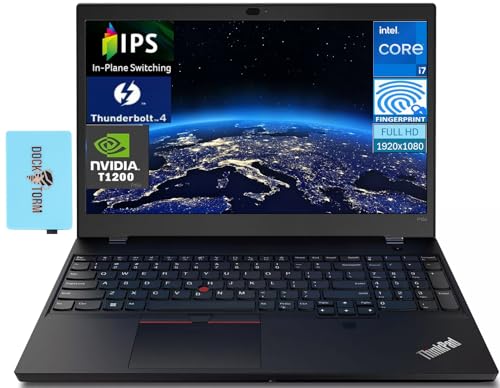
The ThinkPad P15v Gen 3 is the value entry in Lenovo’s workstation range, and this configuration (21D8S0SM00) is specified the way an editor would want: a 14-core Intel Core i7-12700H, 32 GB of RAM, a 512 GB PCIe SSD and an NVIDIA T1200 with 4 GB of graphics memory. The 15.6-inch FHD IPS anti-glare display suits HD timelines and lighter 4K projects, Thunderbolt 4 covers fast external drives and docks, and a fingerprint reader handles sign-in. The P15v line keeps the ThinkPad keyboard and build while trimming the flagship P15’s expansion and top-end GPU options, which is the right trade for editors whose projects live in HD or uncomplicated 4K. It runs Windows 11 Pro.
- Strength: 14-core i7-12700H with 32 GB RAM is a strong editing base at this tier
- Strength: NVIDIA T1200 certified graphics for stable professional application support
- Strength: Thunderbolt 4 and Windows 11 Pro included
- Trade-off: 512 GB SSD is tight for camera originals; plan on external or added storage
- Trade-off: T1200 trails the RTX A-series cards here on effects-heavy timelines
Skip it if your typical project is multicam 4K with heavy effects, where the stronger GPUs above earn their keep.
Which One Fits Your Situation
You grade in 4K and deliver colour-critical work
Choose the ThinkPad P15 Gen 2. Its 4K UHD factory-calibrated panel is the only display in this group suited to grading, and the RTX A2000 plus 32 GB of RAM covers the performance side.
Your timelines are effects-heavy
Choose the ZBook Fury 15 G8. The RTX A3000’s 6 GB of VRAM is the resource that plug-ins, noise reduction and stacked effects run out of first, and the Fury has the most of it.
You edit on the move and dock at a desk
Choose the Dell Precision 3571. It is the lightest machine here, its 14-core processor chews through exports, and its limited internal panel matters far less when a calibrated monitor waits at your desk.
You want a workstation on a controlled budget
Choose the ThinkPad P15v Gen 3. You give up the flagship GPUs and panels, but the 14-core CPU and 32 GB of RAM keep everyday HD and light 4K editing responsive.
Common Mistakes
- Buying a gaming laptop for the GPU name alone and missing the certified drivers and build quality that workstations provide.
- Judging a display by resolution only, when gamut coverage and calibration decide whether grades translate.
- Assuming 16 GB of RAM is enough for 4K timelines with browser tabs, scopes and plug-ins competing for memory.
- Ignoring internal expansion: socketed RAM and a spare M.2 slot can add years to a workstation’s useful life.
- Forgetting VRAM: once GPU memory fills, playback resolution drops and renders slow down regardless of CPU speed.
- Overlooking the operating system version when a studio’s software or IT policy requires a specific one.
FAQ
Is a mobile workstation better than a gaming laptop for video editing?
For professional work, usually yes. Workstation GPUs use ISV-certified drivers validated for stability in professional applications, and workstation chassis are designed for sustained loads, easier upgrades and longer service life. A gaming laptop can be faster on paper, but the workstation is built for reliability across long render queues.
How much VRAM does 4K editing need?
Four gigabytes handles HD and modest 4K timelines. Effects, noise reduction, high frame rates and multiple GPU-accelerated layers push usage higher, which is why the 6 GB RTX A3000 in the ZBook Fury 15 G8 is the safer pick for effects-heavy 4K work.
Can these laptops be upgraded later?
Yes. All four use socketed SO-DIMM memory rather than fully soldered RAM, and each offers M.2 storage expansion. The ThinkPad P15 Gen 2 and ZBook Fury 15 G8 are the most generous, with four memory slots and multiple drive bays on this generation of chassis.
Does the display really matter if I mostly cut and assemble?
Less than it does for grading. If your work is editing structure, audio and titles, a basic FHD panel like the one on the Precision 3571 is workable, especially docked. The moment you make final colour decisions, a wide-gamut calibrated display such as the P15 Gen 2’s 4K panel becomes essential.
Why do these machines use older processors?
Mobile workstations trail consumer launches because manufacturers validate each platform for professional software and long-term support. The 11th-generation chips in the P15 Gen 2 and ZBook Fury remain capable editing processors, while the 12th-generation parts in the Precision 3571 and P15v Gen 3 add cores and DDR5 support.
More from Amazon
Programs that pair well with the guide above. Offers and eligibility are set by Amazon and may change.
Free shipping on eligible items, Prime Video and more. Eligible new members can start with a free trial.
Start a Prime free trialA Prime membership for ages 18-24 with a trial period. Eligibility is set by Amazon.
See Prime for Young AdultsAudiobooks and podcasts to listen to on the go. Eligible new members can start with a free trial.
Try Audible freeAd-free music streaming. Eligible new subscribers can start with a free trial.
Try Music Unlimited freeAs an Amazon Associate we earn from qualifying purchases.









Write Your Review
No reviews yet. Be the first to share your experience!