

Key takeaways
- Compare four 14-inch mobile workstations for 3D rendering, with RTX 500 Ada and RTX A500 graphics, 32GB RAM, displays, ports and upgrade paths compared.
Choosing a 14-inch mobile workstation for 3D rendering is really a decision about which compromise you can live with. Every machine in this size class tops out at an entry-level professional GPU with 4GB of video memory, so no pick here renders like a desktop tower. What actually separates them is the GPU generation, how hard the processor can work during scene setup and baking, whether the memory can grow later, and how good the screen is for judging your frames.
This guide is for freelance 3D artists, product designers and arch-viz artists who model and render away from a main desk machine, and for small studios issuing portable workstations to staff. The picks below were chosen from the product names and specifications on their Amazon listings, covering both current Ada-generation models and proven previous-generation machines that remain on sale.
Quick Picks
As an Amazon Associate we earn from qualifying purchases
| Product | Best for | Key spec from title |
|---|---|---|
| Lenovo ThinkPad P14s Gen 5 | Rendering stills and short clips away from the desk | NVIDIA RTX 500 Ada, 3K 120Hz display, 32GB RAM |
| Dell Precision 3490 | Buyers who want Dell’s current entry workstation | NVIDIA RTX 500 Ada, Core Ultra 7 165H, 32GB RAM |
| Lenovo ThinkPad P14s Gen 4 | Dock-heavy desks that need wired Ethernet | NVIDIA RTX A500, 2x Thunderbolt 4, RJ-45 port |
| HP ZBook Firefly 14 G10 | Carrying a workstation in a bag all day | NVIDIA RTX A500, 32GB RAM, 3.2 lbs |
How to Choose
The graphics card sets your render ceiling
In this size class the GPU choice is narrow but decisive. Current models carry NVIDIA’s RTX 500 Ada, while the previous generation uses the RTX A500; both are professional cards with 4GB of GDDR6 memory and drivers certified for applications such as Blender, Maya and SolidWorks. The Ada card is the newer architecture and the stronger renderer core for core, but the 4GB memory limit matters more than the badge: large scenes, high-resolution textures and heavy geometry can exceed it and push work back onto system memory. Check that your typical scene fits before paying extra for the newer chip.
Processor power for everything around the render
Rendering is only the final step. Scene building, physics simulation, texture baking and viewport navigation lean on the CPU, and thin 14-inch chassis cannot sustain desktop-level power for long. H-class processors such as the Core Ultra 7 155H and 165H hold higher speeds under load than the low-power U-series chips still found in some configurations of the same model names. When you compare two listings of one model, the processor suffix is the detail to read first, because it predicts how the machine feels during long working sessions, not just in short bursts.
Memory and storage: what you can upgrade later
Most listings in this class ship with 32GB of memory, which is a sensible floor for 3D work, but the upgrade path splits the field. Machines with two SODIMM slots, such as the ThinkPad P14s Gen 5 and the ZBook Firefly line, let you move to 64GB later with ordinary laptop memory. Designs with soldered LPDDR5 memory, including the ThinkPad P14s Gen 4 below, are fixed at whatever capacity you order. Storage is easier: every pick here uses a standard M.2 SSD that can be swapped, which matters once project libraries and render output start filling the drive.
Display quality and ports for desk work
A built-in screen in this class ranges from a basic 300-nit Full HD panel to a 3K display with full DCI-P3 coverage, and the gap shows when you judge colour and fine detail in a render. If the laptop screen is your only monitor, prioritise resolution and colour coverage over refresh rate. Ports decide the rest of the desk setup: Thunderbolt 4 docks drive external monitors and storage, HDMI covers a direct display connection, and a built-in Ethernet port, now rare in thin workstations, still matters on studio networks that restrict Wi-Fi.
The 4 Best Options
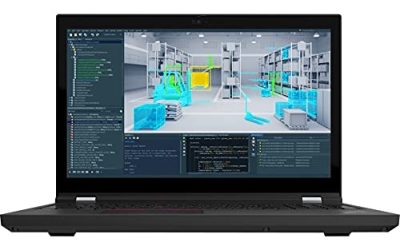
Lenovo ThinkPad P14s Gen 5

The P14s Gen 5 is the strongest renderer in this group because it pairs the newer RTX 500 Ada with a Core Ultra 7 155H and a 3K display that covers the full DCI-P3 gamut, so frames look close to final output while you work. This listing’s 32GB of memory sits in two SODIMM slots, leaving a genuine upgrade path to 64GB, and the 75Wh battery is the largest here. It suits artists whose portable machine is also their main machine, and who judge renders on the built-in screen rather than an external monitor.
Specs
- Processor: Intel Core Ultra 7 155H (P-cores up to 4.80 GHz)
- Graphics: NVIDIA RTX 500 Ada Generation, 4GB GDDR6
- Memory: 32GB DDR5-5600 (2 x 16GB SODIMM)
- Storage: 1TB M.2 2280 PCIe Gen4 SSD
- Display: 14.5-inch 3K (3072 x 1920) IPS, 120Hz, 100% DCI-P3, 430 nits
- Battery: 75Wh
- Ports: 2x Thunderbolt 4, HDMI 2.1, 2x USB-A
- Wireless: Wi-Fi 6E, Bluetooth 5.3
- Operating system: Windows 11 Pro
- Weight: from 2.89 lbs
Best for: Artists who render and colour-check on the laptop’s own screen
Watch out for: The 14.5-inch panel makes this the largest machine here, and many listings are seller-upgraded configurations, so confirm the seller and warranty terms
ASIN: B0D8RB7XYF
Dell Precision 3490

Dell’s Precision 3490 is the current entry point in the Precision line and matches the ThinkPad above on the two specs that matter most for rendering: an RTX 500 Ada GPU and 32GB of memory, here paired with the slightly stronger Core Ultra 7 165H processor. At 3.09 lbs it stays genuinely portable, and this listing is a standard Dell configuration rather than a memory-upgraded reseller build. It fits buyers who prefer Dell’s support organisation and keyboard, and whose rendering is mostly stills and short sequences rather than long animation queues.
Specs
- Processor: Intel Core Ultra 7 165H
- Graphics: NVIDIA RTX 500 Ada, 4GB
- Memory: 32GB
- Storage: 1TB SSD
- Display: 14-inch Full HD
- Weight: 3.09 lbs
Best for: Buyers who want a current Dell workstation in a light chassis
Watch out for: This listing’s Full HD panel is the basic screen option, so plan on an external monitor for detailed colour work
ASIN: B0D426BDPH
Lenovo ThinkPad P14s Gen 4

The Gen 4 P14s runs the previous RTX A500 graphics generation, yet it remains relevant because the rest of the package is complete: a 12-core Core i7-1360P, 32GB of memory and a port selection that still includes wired Ethernet alongside two Thunderbolt 4 ports. That makes it the natural pick for studio desks where the laptop lives on a dock and the network is cabled. Its screen is the weakest here for colour work, so treat it as a modelling and render node that happens to be portable, and judge finals on an external display.
Specs
- Processor: Intel Core i7-1360P (12 cores, up to 5.0 GHz)
- Graphics: NVIDIA RTX A500, 4GB GDDR6
- Memory: 32GB LPDDR5x-5600
- Storage: 1TB M.2 2280 PCIe 4.0 NVMe SSD
- Display: 14-inch WUXGA (1920 x 1200) IPS, 300 nits, anti-glare
- Ports: 2x Thunderbolt 4, HDMI, RJ-45 Ethernet, 2x USB 3.2 Gen 1
- Wireless: Wi-Fi 6E, Bluetooth 5.1
- Operating system: Windows 11 Pro
Best for: Dock-based studio work on a wired network
Watch out for: Memory is soldered, so the 32GB fitted at purchase is the lifetime maximum
ASIN: B0CD2VYHH1
HP ZBook Firefly 14 G10

HP’s Firefly has always been the portability-first workstation, and this G10 configuration keeps that character: 3.2 lbs, 32GB of memory and the RTX A500 for certified-driver 3D work. Its Core i7 is a low-power part, so sustained CPU rendering runs slower than the H-class chips in the newer machines above, but for modelling, viewport work and overnight still renders it remains a sensible, lighter load to carry. It suits consultants and site-based designers whose rendering happens in bursts between meetings rather than in continuous production queues.
Specs
- Processor: Intel Core i7 (1.80 GHz base clock)
- Graphics: NVIDIA RTX A500, 4GB
- Memory: 32GB
- Storage: 1TB SSD
- Display: 14-inch WUXGA (1920 x 1200)
- Weight: 3.2 lbs
Best for: Site visits and travel days where carry weight comes first
Watch out for: Confirm the listing states the RTX A500, because many Firefly G10 listings use integrated graphics only
ASIN: B0C3HY6V2N
Which One Fits Your Situation
You render stills and short animations on the road
Take the ThinkPad P14s Gen 5. It has the newest GPU generation here, the sharpest and most colour-accurate screen for checking frames without a monitor, and memory slots that let you grow to 64GB when scenes get heavier. Its larger 14.5-inch panel is the trade-off, so pick it when the laptop is your main workstation rather than a companion device.
You split the day between CAD and rendering
The Dell Precision 3490 balances both halves of that work. Its Core Ultra 7 165H keeps large assemblies responsive in CAD viewports, the RTX 500 Ada carries certified drivers for the same applications, and 32GB of memory is enough for assemblies and render scenes to stay open side by side. Add a dock and an external monitor at the desk.
Your desk is docked and wired
Choose the ThinkPad P14s Gen 4. The built-in Ethernet port and dual Thunderbolt 4 connections suit a permanent desk setup with network storage and multiple displays, and the RTX A500 still handles modelling and queued renders competently. Just order it knowing the soldered memory fixes your RAM ceiling for the life of the machine.
You carry the machine between sites all week
The HP ZBook Firefly 14 G10 is the lightest full configuration here at 3.2 lbs, and its 32GB of memory means you are not trading capacity for portability. Accept slower sustained CPU renders as the price of the light chassis, and push long jobs to overnight or to a desktop back at base.
Common Mistakes
- Expecting desktop render times from a 4GB entry-level GPU, then blaming the software when scenes crawl.
- Ordering a same-name configuration with integrated graphics because the listing headline did not name the GPU.
- Buying a soldered-memory model in a low capacity to save money, with no way to upgrade it later.
- Judging final colours on a 300-nit, narrow-gamut panel instead of a calibrated external monitor.
- Comparing listings by model name alone when sellers vary the CPU, memory and storage inside the same model.
Frequently Asked Questions
Can a 14-inch workstation handle Blender or Maya rendering?
Yes, within limits. GPU renderers such as Cycles and Redshift run on the RTX cards in these machines, and stills or short clips are realistic work. The 4GB of video memory is the binding constraint: very large scenes may fall back to slower CPU rendering or fail to fit, so keep textures and geometry lean or send final production renders to a desktop or render service.
Is the RTX 500 Ada much faster than the RTX A500?
The RTX 500 Ada is the newer architecture and the stronger card per core, with more modern ray-tracing hardware, so it finishes comparable renders sooner and handles viewports more smoothly. Both cards share the same 4GB memory ceiling, though, which means scene size limits feel identical. Buy the Ada models for speed and longevity; buy A500 models when the rest of the package suits you better.
How much RAM does 3D rendering actually need?
Thirty-two gigabytes, the capacity fitted to every pick here, covers most individual artists’ scenes alongside a modelling application, reference images and a browser. Move to 64GB if you routinely keep several heavy applications open, work with very large scenes, or run simulations. On soldered-memory models that decision is permanent, so it has to be made at purchase, not later.
Does the screen matter if I mostly render?
It matters at the two ends of the job: judging material colours and lighting while you build a scene, and checking the finished frames. A high-resolution, wide-gamut panel such as the ThinkPad P14s Gen 5’s 3K display makes both steps reliable on the laptop alone. Basic Full HD panels are fine for modelling, but final colour decisions deserve a better screen.
More from Amazon
Programs that pair well with the guide above. Offers and eligibility are set by Amazon and may change.
Free shipping on eligible items, Prime Video and more. Eligible new members can start with a free trial.
Start a Prime free trialA Prime membership for ages 18-24 with a trial period. Eligibility is set by Amazon.
See Prime for Young AdultsAudiobooks and podcasts to listen to on the go. Eligible new members can start with a free trial.
Try Audible freeAd-free music streaming. Eligible new subscribers can start with a free trial.
Try Music Unlimited freeAs an Amazon Associate we earn from qualifying purchases.



Write Your Review
No reviews yet. Be the first to share your experience!