

Key takeaways
- The best SDR receivers for most beginners are the RTL-SDR Blog V4 for low-cost wideband scanning, the Airspy Mini for cleaner VHF/UHF reception, and the SDRplay RSP1B for the broadest coverage when you also want serious HF and spectrum-monitoring capability.…
The best SDR receivers for most beginners are the RTL-SDR Blog V4 for low-cost wideband scanning, the Airspy Mini for cleaner VHF/UHF reception, and the SDRplay RSP1B for the broadest coverage when you also want serious HF and spectrum-monitoring capability.
Software-defined radios, or SDRs, replace much of a conventional radio’s tuning hardware with a computer, tablet, or phone. That makes one small receiver useful for signals such as FM broadcast, aviation, marine, amateur radio, weather services, and—when legally permitted—other unencrypted transmissions. The right choice depends less on the highest advertised frequency than on noise performance, software support, antenna setup, and how often you intend to use it.
Our top picks
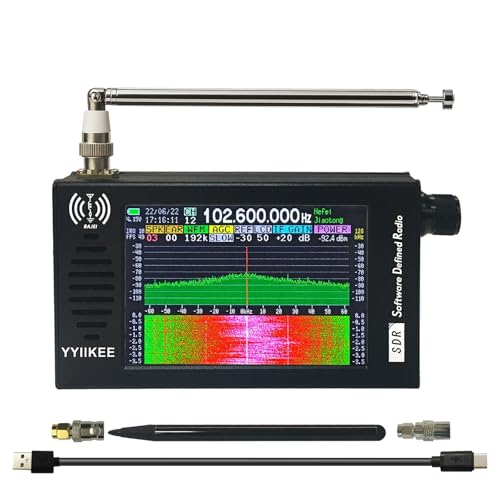
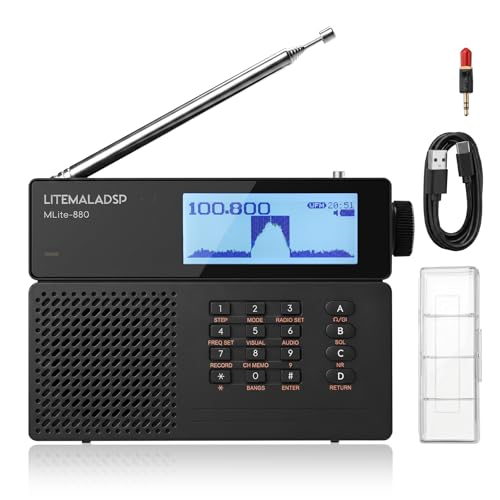

As an Amazon Associate we earn from qualifying purchases at no extra cost to you. Ratings are shown as listed on Amazon.
Best SDR receivers by situation
| Situation | Best fit | Why | Typical market range |
|---|---|---|---|
| Lowest-cost introduction to VHF/UHF | RTL-SDR Blog V4 | Very affordable, USB-powered, broad software support, and a built-in bias tee for some active antennas | $30–$50 |
| Small, cleaner receiver for local VHF/UHF scanning | Airspy Mini | Good dynamic range and 6 MHz sampling bandwidth in a compact USB device | $90–$130 |
| HF through VHF monitoring | Airspy HF+ Discovery | Strong performance from longwave and HF through VHF, with excellent handling of crowded bands | $250–$300 |
| One receiver for HF, VHF, and UHF experimentation | SDRplay RSP1B | Wide tuning range, up to 10 MHz bandwidth, and flexible software ecosystem | $130–$180 |
| Portable phone or tablet operation | RTL-SDR Blog V4 with a compatible USB adapter | Low power demand and broad Android support, although setup varies by device | $35–$70 including adapter and cables |
Prices are general market ranges and can vary by region, accessories, and bundled antennas. A receiver alone is rarely a complete station: budget for a suitable antenna, coaxial cable, adapters, and possibly a powered USB hub.
Head-to-head: the receivers that make the shortlist
RTL-SDR Blog V4: the practical beginner choice
The RTL-SDR Blog V4 covers approximately 500 kHz to 1.766 GHz, with a gap in its direct coverage around some frequencies depending on its tuner and operating mode. It is particularly useful for FM radio, aviation, marine, amateur VHF/UHF, weather transmissions, and general signal discovery. Its 2.4 MHz maximum practical bandwidth is enough for learning how to identify signals, but it cannot display as much spectrum at once as more expensive models.
The V4’s greatest advantage is its community support. It works with applications such as SDR++, SDR#, CubicSDR, GQRX, and many specialized decoding tools. It is also inexpensive enough to leave configured at home while taking a second unit on trips. The limitations are equally important: strong nearby signals can overload it, the supplied small antenna is a compromise, and it is not the best choice for weak-signal work in a crowded RF environment.
Airspy Mini: better VHF/UHF performance in a small package
The Airspy Mini tunes roughly from 24 MHz to 1.8 GHz and provides up to 6 MHz of bandwidth. Compared with inexpensive RTL-SDR hardware, it generally offers cleaner reception and better resistance to overload when several strong stations are nearby. That matters in cities, near broadcast towers, and during busy aviation or amateur-radio events.
It does not cover the lower HF bands directly, so it is not a universal shortwave receiver. Choose it when your priority is VHF/UHF scanning rather than a single device for every part of the radio spectrum. Airspy’s own software ecosystem is mature on desktop computers, and third-party applications add flexibility.
Airspy HF+ Discovery: the specialist for HF through VHF
The Airspy HF+ Discovery covers approximately 9 kHz to 31 MHz and 64 MHz to 260 MHz. That combination makes it especially attractive for shortwave, utility-signal research, amateur HF, longwave, AM broadcast, and selected VHF work. Its narrow-band filtering and strong dynamic-range performance are valuable where inexpensive dongles become noisy or distorted.
The missing 31–64 MHz section is a real consideration. It is also more expensive and less suited to casual “scan everything” use than an inexpensive wideband dongle. Select it when signal quality on HF matters more than complete continuous coverage.
SDRplay RSP1B: the broad-coverage generalist
The RSP1B tunes from about 1 kHz to 2 GHz and can provide up to 10 MHz of spectrum bandwidth, depending on settings and computer performance. It is a strong option for someone who wants to move between shortwave, broadcast FM, aviation, amateur radio, and UHF without changing receivers.
Its wide bandwidth can show many channels at once, which is useful for finding activity and recording a section of spectrum. The trade-off is a steeper learning curve. SDRconnect and SDRUno offer substantial control, while third-party software can require more configuration than the simplest RTL-SDR setup.
What matters more than the headline frequency range?
Bandwidth and sample rate
Bandwidth determines how much spectrum appears on screen at one time. A 2.4 MHz receiver can display a useful slice of local VHF activity; a 10 MHz-capable receiver can reveal a much wider section. Wider bandwidth consumes more USB throughput, computer processing, and storage. For routine scanning, 2–6 MHz is often sufficient. For spectrum surveys and simultaneous signal capture, more is useful.
Computer compatibility
Windows offers the broadest selection of drivers and applications. Linux works well with SDR++ and GQRX, although installation can require more technical confidence. macOS support is available through several cross-platform programs, but some manufacturer-specific tools are Windows-focused. Check whether your chosen program supports the receiver’s driver before buying.
A recent low-power laptop is normally adequate for one receiver. Recording wide bandwidth, running multiple decoders, or using several virtual machines requires more memory and processing capacity. USB 2.0 is generally enough for many entry-level devices; use a short, shielded cable and avoid unpowered hubs when possible.
Mobile and tablet use
Android is usually the most practical mobile platform because USB On-The-Go adapters and SDR driver applications are widely available. An Android phone must support USB host mode, and the adapter must provide the correct USB connector. iPhone and iPad use is more restricted by operating-system permissions, application support, and adapter requirements.
Mobile operation is convenient for short sessions, but it can drain a phone quickly. A receiver drawing about 0.3–0.5 watts may appear modest, yet a phone supplying that load through an adapter can use several watt-hours during a long scan. A powered hub or external battery is preferable for extended field work.
Antennas: the upgrade that changes results most
There is no single best antenna for every frequency. A small telescopic antenna is convenient for strong local VHF/UHF signals. A quarter-wave antenna is more efficient around a target band; at 150 MHz, a quarter wavelength is approximately 50 cm, while at 700 MHz it is approximately 11 cm. A magnetic-mount vehicle antenna can improve outdoor reception, but it needs a suitable ground plane and safe cable routing.
HF usually needs a longer wire, loop, or purpose-built active antenna. Indoors, electrical wiring, LED lamps, USB chargers, and computers can create more noise than the receiver itself. Place the antenna away from power supplies, use ferrite chokes if appropriate, and avoid running coaxial cable parallel to mains cables for long distances.
Beginner-friendly software and a simple setup
- Install the correct driver or receiver support package for your operating system.
- Connect the receiver before launching the SDR application so it can be detected.
- Attach an antenna before enabling the receiver; operating without one can produce misleading noise and, for some transmit-capable equipment, damage.
- Choose a modest sample rate first, such as 2–3 MHz, and set gain manually or use a conservative automatic setting.
- Tune to a known local FM, aviation, weather, or amateur signal to confirm that the system works.
- Reduce gain if signals look smeared, clipped, or unusually broad. Increase it only when weak signals remain below the noise floor.
SDR++ is a strong general starting point because it runs on major desktop platforms and presents the essential controls without requiring a large suite of separate modules. GQRX is another approachable option, especially on Linux and macOS. SDR# is widely used with compatible Windows receivers. Specialized decoding programs can identify digital modes, but learn the legal restrictions first: receive only signals that you are permitted to monitor, and never attempt to defeat encryption or access controls.
Power use and ownership costs
USB receivers are relatively low-energy equipment. As a practical estimate, a receiver drawing 0.5 watts for four hours each week uses about 104 watt-hours per year:
0.5 watts × 4 hours × 52 weeks = 104 watt-hours, or 0.104 kWh.
The computer is usually the larger energy expense. A laptop using 25 watts for the same schedule consumes about 5.2 kWh per year, while a continuously running desktop can use many times more. For occasional monitoring, use a laptop on battery or a low-power mini PC. For permanent recording, schedule the receiver to run only during the bands and times that matter.
The parts most likely to wear are connectors, inexpensive coaxial leads, telescopic antenna joints, and USB cables—not the receiver chip itself. Keep the unit ventilated, protect it from static discharge, and disconnect an outdoor antenna during nearby thunderstorms. Avoid repeatedly bending thin coax at the connector. If reception suddenly worsens, test the cable and antenna first; replacing the receiver is rarely the first sensible diagnosis.
Final recommendation
Choose the RTL-SDR Blog V4 if you are learning, mainly scan VHF/UHF, and want the lowest-risk purchase. Choose the Airspy Mini if crowded local signals and cleaner VHF/UHF reception justify spending more. Choose the Airspy HF+ Discovery for serious HF and shortwave work, and the SDRplay RSP1B if continuous coverage from near-DC through UHF and a wide visual spectrum are your priorities. Whichever model you buy, a properly matched antenna, sensible gain settings, and low-power computer setup will usually improve the experience more than moving to the next receiver on a specification sheet.




Write Your Review
No reviews yet. Be the first to share your experience!